Package org.usfirst.frc.team3487
Class REVDigitMXPDisplay
- java.lang.Object
-
- org.usfirst.frc.team3487.REVDigitMXPDisplay
-
public class REVDigitMXPDisplay
extends java.lang.Object
Bindings for a REV Digit MXP Display wired to the MXP Port of a RoboRIO. Note that only one MXP Display can be controlled per robot. Because of this, the class is provided as a singleton.- Since:
- 0.1.0
-
-
Method Summary
All Methods Static Methods Instance Methods Concrete Methods Modifier and Type Method Description voidclear()Clears the display by sending it four spaces.voiddisplayBattery()formatdefaults to a DecimalFormat with pattern string"##.0V"voiddisplayBattery(java.text.DecimalFormat format)Displays current battery voltage.voiddisplayBatterySOC()Displays the battery's State of Charge as a percentage.voiddisplayScrollText(java.lang.String text, double delay)Sets string to scroll across display (should be called every loop of robot program)voiddisplayText(java.lang.String text)Writes string to the display boardbooleangetAButtonPressed()returns true the first function call that the A button is pressed for.booleangetBButtonPressed()returns true the first function call that the B button is pressed for.booleangetButtonA()Get value of button A's DigitalInput.booleangetButtonB()Get value of button B's DigitalInput.booleangetDebug()Get whether or not the MXP Display is in debug mode.static REVDigitMXPDisplaygetInstance()Fetches the singleton instance of this classdoublegetPot()Get voltage across the potentiometer.voidsetDebug(boolean debug)Set whether or not the MXP Display is in debug mode.
-
-
-
Method Detail
-
getDebug
public boolean getDebug()
Get whether or not the MXP Display is in debug mode. While in debug mode, the string to be displayed will be printed out alongside being displayed.- Returns:
- debug mode state
-
setDebug
public void setDebug(boolean debug)
Set whether or not the MXP Display is in debug mode. While in debug mode, the string to be displayed will be printed out alongside being displayed.- Parameters:
debug- desired debug mode state
-
getInstance
public static REVDigitMXPDisplay getInstance()
Fetches the singleton instance of this class- Returns:
- singleton of the REV Display
-
displayText
public void displayText(java.lang.String text)
Writes string to the display board- Parameters:
text- the text to be written. Characters after the fourth (excluding periods) will be ignored, as will periods placed before the first occurence of a non-period character. Strings with less than four non-period character will be padded with spaces to the right.
-
displayScrollText
public void displayScrollText(java.lang.String text, double delay)Sets string to scroll across display (should be called every loop of robot program)- Parameters:
text- The text to be written. Text will be processed similarly todisplayText(String)Note that because text is processed with the same rules asdisplayText(String), nothing will be shown on the display when the scrolling section contains only periods.delay- Delay between character movements in seconds- See Also:
displayText(String)
-
displayBattery
public void displayBattery(java.text.DecimalFormat format)
Displays current battery voltage.- Parameters:
format- DecimalFormat to display voltage with
-
displayBattery
public void displayBattery()
formatdefaults to a DecimalFormat with pattern string"##.0V"- See Also:
displayBattery(DecimalFormat)
-
displayBatterySOC
public void displayBatterySOC()
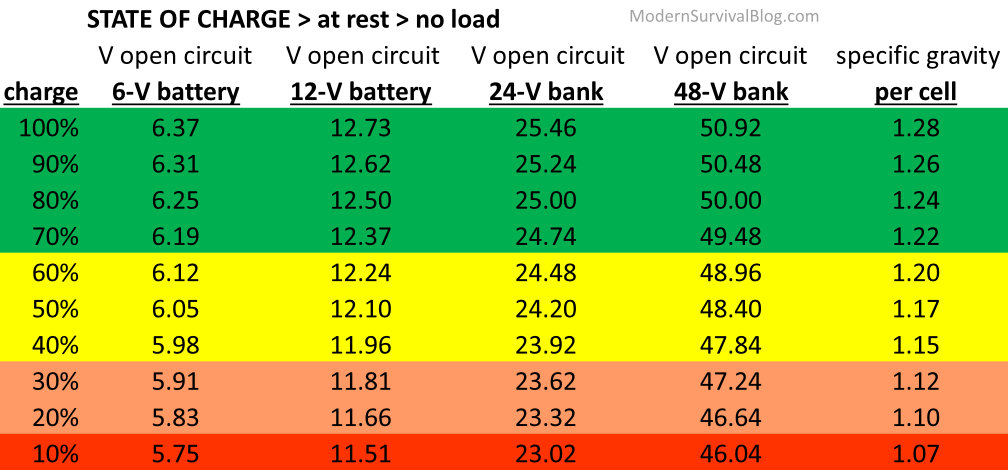
Displays the battery's State of Charge as a percentage. This value is calculated according to this chart. Generally, a value above 80% should work for the purposes of an FRC Robot
-
clear
public void clear()
Clears the display by sending it four spaces.
-
getButtonA
public boolean getButtonA()
Get value of button A's DigitalInput.- Returns:
- true if button is released, false if button is held
-
getButtonB
public boolean getButtonB()
Get value of button B's DigitalInput.- Returns:
- true if button is released, false is button is held
-
getPot
public double getPot()
Get voltage across the potentiometer.- Returns:
- voltage running through potentiometer
-
getAButtonPressed
public boolean getAButtonPressed()
returns true the first function call that the A button is pressed for.- Returns:
- whether or not the A button has been pressed
-
getBButtonPressed
public boolean getBButtonPressed()
returns true the first function call that the B button is pressed for.- Returns:
- whether or not the B button has been pressed
-
-